The best apps to learn Chinese
No app is going to make you fluent in Chinese. What a good one does is get you from nothing to a few thousand words you can read, write and recognise by ear, fast enough that you do not quit in week three.
Chinese is also a language where the choice matters more than usual, because it is one of the few with no alphabet. It has thousands of characters instead, and each one carries its own pronunciation, shape and meaning: three separate things to learn rather than one, and most apps do not cover all three well enough.
After using the apps that Chinese learners actually end up with, these are the four we recommend:
 Hanzio, best for learning characters
 Pleco, best dictionary
 HelloChinese, best for absolute beginners
 Du Chinese, best for reading practice
Each is best at a different part of learning Mandarin, so the right one depends on what is actually stopping you. Most people end up using two or three together.
Disclosure: Hanzio is our app, so we are not impartial. We wrote this because picking the right combination matters more than pretending one app does everything. Every app here is judged against the same criteria, we say plainly where competitors do it better, and Hanzio's own weaknesses are listed with the rest. If you finish this and install Pleco instead, that is a good outcome.
Which app should you choose?
| If you want to… | Use |
|---|---|
| Start from zero | HelloChinese |
| Look words up | Pleco, or Hanzio in Spanish |
| Remember vocabulary long term | Hanzio |
| Learn characters and what they are made of | Hanzio |
| Practise handwriting | Hanzio or Skritter |
| Read stories at your level | Du Chinese |
| Practise speaking and tones out loud | HelloChinese |
| Prepare for HSK | HelloChinese for the course, Hanzio for the words |
| Spend nothing at all | Pleco plus Anki |
| Build a daily habit | Duolingo |
| Make the fastest overall progress | HelloChinese, then Hanzio, then Du Chinese |
What we looked for
It has to teach the characters, not just how words sound
Knowing that a word pronounced xuéxí means "to study" is not the same as recognising 学习 when you see it, and neither of those is the same as being able to write it from memory.
It has to treat a wrong tone as a wrong word
A tone is not an accent you can add later. If an app lets a wrong tone pass, you end up with a large vocabulary that nobody can follow when you say it out loud.
It has to move words into long-term memory
Almost no Chinese word carries over from English, so volume matters. Introducing vocabulary is easy; making it stick a month later is the hard part.
It should tell you what is worth learning
There are tens of thousands of words. An app that gives you five synonyms with no sense of which one people say has pushed the real work back onto you.
How the seven apps compare
Judged only on what each app does itself, not on what you could bolt onto it. "Some" means the feature exists but is not what the app is for. Features and pricing last verified July 2026; check the store listing before paying for anything. Under Frequency, "sort only" means results are ordered by how common a word is without ever showing a figure.
| App | Dictionary | Course | Writing | Speaking | Reading | Frequency | Free |
|---|---|---|---|---|---|---|---|
| Hanzio | Yes | No | Yes | No | Some | Shown | Yes |
| Pleco | Yes | No | Some | No | Some | Sort only | Yes |
| HelloChinese | No | Yes | Some | Yes | Some | No | Some |
| Du Chinese | No | No | No | No | Yes | No | Some |
| Skritter | No | No | Yes | No | No | No | Trial |
| Anki | No | No | Some | No | No | No | Yes |
| Duolingo | No | Yes | No | Some | No | No | Yes |
Scroll the table sideways to see every column.
Who this is for
This guide is for someone learning Mandarin on their own, or alongside a class, who wants to know which two or three apps are worth the space on their phone. It assumes you are learning to read as well as speak. If you only ever want to hold a spoken conversation on holiday, most of this is more machinery than you need.
It is worth being precise about why Chinese is different, because it is the whole reason the picks come out the way they do.
In Spanish, French or German you learn an alphabet of a couple of dozen letters once, and from then on pronunciation and spelling are usually two views of the same information. See a word you have never met and you can say it. Hear one you have never seen and you can make a fair attempt at writing it. The two skills carry each other, so learning a word is essentially one job.
Chinese has no alphabet. It has characters, and a character does not reliably tell you how to say it. 学 is pronounced xué, but nothing in the shape says so. An educated native speaker knows somewhere in the region of 6,000 characters; roughly 3,000 covers the vast majority of everyday text, and the official standard table runs to 8,105.
So where an alphabetic language gives you two linked dimensions, Chinese gives you three separate ones:
- The pronunciation, written in pinyin (xué)
- The character, which you have to be able to both read and write (学)
- The meaning ("to study")
Any one of the three can be missing while the other two are solid. You can know a word by sight and be unable to say it. You can know it by ear and be unable to write it. English gives you almost nothing to start from either. A handful of words were borrowed from English and still show it (咖啡 kāfēi, coffee; 沙发 shāfā, sofa), but where French hands an English speaker information for free, Chinese asks you to build essentially every word from nothing.
Mandarin then adds one more layer inside pronunciation. Every syllable carries a tone, a pitch shape you have to produce, marked in pinyin by an accent over the vowel:
- First tone (mā) stays high and flat.
- Second tone (má) rises, roughly like the end of an English question.
- Third tone (mǎ) dips down, then comes back up.
- Fourth tone (mà) falls sharply, like a short command.
- Neutral tone (ma) is light and quick, with no shape of its own.
These are not accents or emphasis in the English sense, where stressing the wrong syllable still leaves a word recognisable. In Chinese the tone is part of the word's identity. 妈 mā is "mother", 麻 má is "hemp", 马 mǎ is "horse", 骂 mà is "to scold", and 吗 ma simply turns a sentence into a question. One syllable, five unrelated meanings. Get the tone wrong and you have not said the word with an accent, you have said a different word.
Why you should trust us
We have spent a long time building a Chinese dictionary and a spaced repetition system, which means we have used every app here closely and know what is genuinely hard about the problem. Read us as an interested expert rather than a disinterested judge, and hold us to the following:
- The criteria in What we looked for are stated before the picks, and every app is judged against the same four.
- Where another app is better, we say so. Pleco is a better dictionary than ours in every respect except one. HelloChinese will teach a beginner faster than we will. Skritter reached stroke-level handwriting practice years before us, and Hanzio's writing mode is built on its idea.
- Every pick, ours included, carries a Flaws but not dealbreakers section, and Hanzio's flaws are the real ones.
- We link only to the app stores for our own app. We are not an affiliate for anything here and earn nothing if you install one of the others.
- Every claim about another app is checkable in that app or its own documentation. Where we got something wrong in an earlier draft, we corrected it rather than leaving the flattering version in.
Best for learning characters: Hanzio
Hanzio
The only app here that is both the dictionary and the study system, so there is nothing to export and import. Every entry, component and example carries a frequency number, so you learn the word people actually say first.
Use this if: characters are your bottleneck, or you are tired of running a dictionary in one app and a review app in another. Do not use this if: you want to be walked through grammar and sentence building. Hanzio teaches you the words; pair it with HelloChinese or a textbook for what to do with them.
Why it's great: look at where the rest of this list leaves you. A dictionary that cannot teach, a course that runs out, and a review app that cannot find vocabulary on its own. Three subscriptions, three sets of progress, and a manual export step in the middle. Closing that gap is the reason Hanzio exists.
The dictionary and the spaced repetition are the same app: 150,000+ entries, simplified and traditional, free, and working with no signal. Look a word up and it becomes a card right there.
Underneath, it is built on two findings from memory research. Spaced repetition means a word comes back just before you would have forgotten it, so the review lands when it does the most work and you spend no time on words you already know. Active recall means you have to pull the answer out of your head rather than recognise it on a page: you write the character, type the pinyin or say what you heard, and only then find out whether you were right. Neither idea is ours, Anki and Skritter are built on them too, but a lot of apps only do the first, and recognising a word in a list of four is much easier than producing it from nothing.
| Learning one new word you just met | What it takes |
|---|---|
| Pleco plus Anki or Skritter | Look it up, save it to a list, export the list, import it, build the card, then guess whether the word was worth the trouble |
| Hanzio | Look it up, see how common it is, add it |
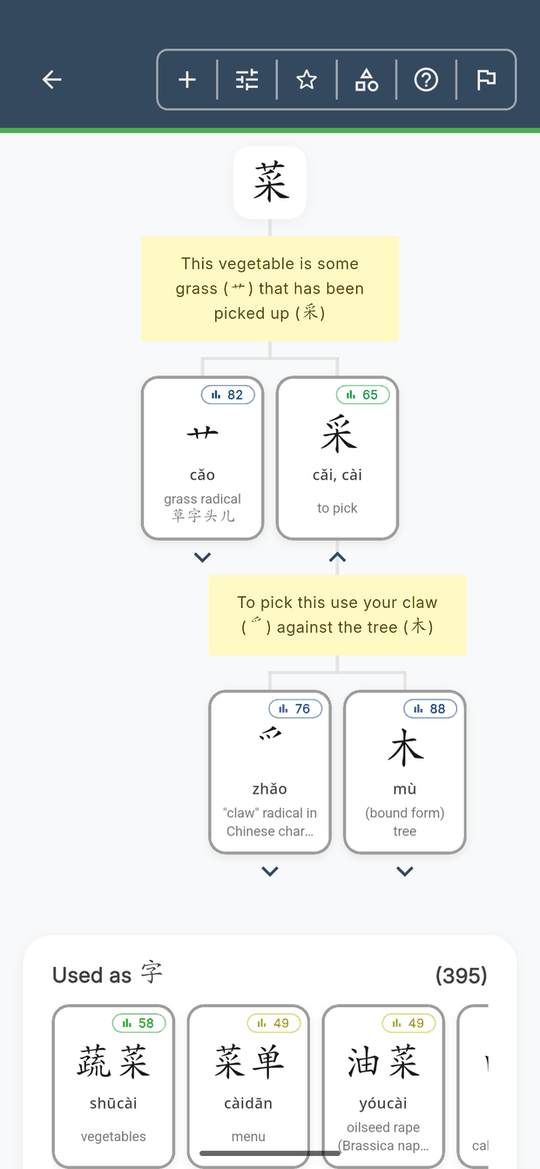
Characters also come apart, recursively, each component carrying its own frequency and a list of every other character built from it. Learn a hundred or so and the thousands built from them stop being arbitrary shapes.
The tone quartet earlier was not a coincidence: 妈, 骂 and 吗 all contain 马 mǎ, sitting there for the sound rather than the meaning. Most characters work this way, one part hinting at the meaning and another at the pronunciation, which is what turns a component tree from trivia into the fastest route through the next thousand characters.
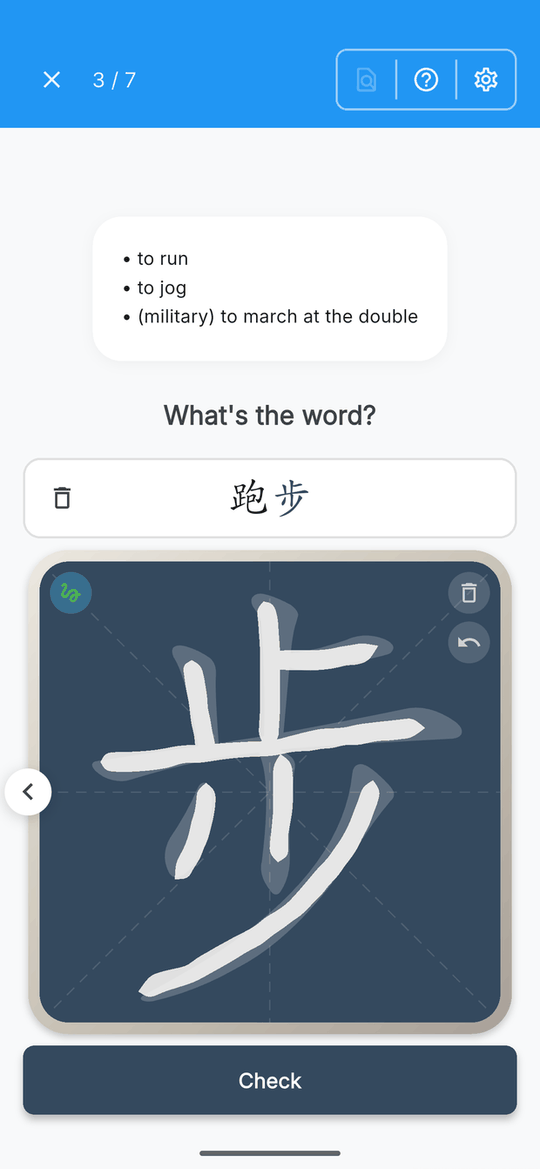
On writing: Skritter proved that drilling strokes beats tapping answers, and we started there rather than stopped there. You get the meaning and produce the whole word yourself (跑步, both characters). It reads the character you actually drew rather than checking your strokes one by one, so a hurried or personal hand is fine as long as the result is recognisable. And if you write a valid synonym instead of the word it asked for, it tells you so and lets you try again rather than marking you wrong.
Flaws but not dealbreakers
There is no grammar course. It is on the roadmap, but today Hanzio will teach you thousands of words and not how to string them together. You need something else alongside it, which for most people means HelloChinese or a textbook.
There is no speaking practice. The audio mode tests whether you recognise a word by ear. It does not listen to you say it and grade your pronunciation, so it will not fix a bad third tone the way HelloChinese will.
There is no reading library. Every entry has example sentences, but there is nothing like Du Chinese's levelled stories. Once you can read a bit, you will want to pair the two.
The free tier is capped by time, not content. The dictionary is unlimited and you can learn any word in it, but daily study is limited unless you upgrade. Whether that is generous or annoying depends on how much you study.
Key features
- Dictionary: 150,000+ entries, simplified and traditional, works offline
- Study modes: meaning, pinyin, writing and audio, each scheduled separately
- Standout: frequency data on every entry, component and example
- Handwriting: draw with your finger, prompted from the meaning, optional stroke-order feedback
- Languages: interface and dictionary in English and Spanish
- Pricing: free dictionary and a daily study allowance; subscription removes the cap
- Works on: iOS, Android
Best dictionary: Pleco
Pleco
The most thorough Chinese dictionary on a phone, free, offline, and unchallenged for over a decade. If you install one thing today, install this one.
Use this if: you are learning Chinese and you read English. That is close to the whole condition.
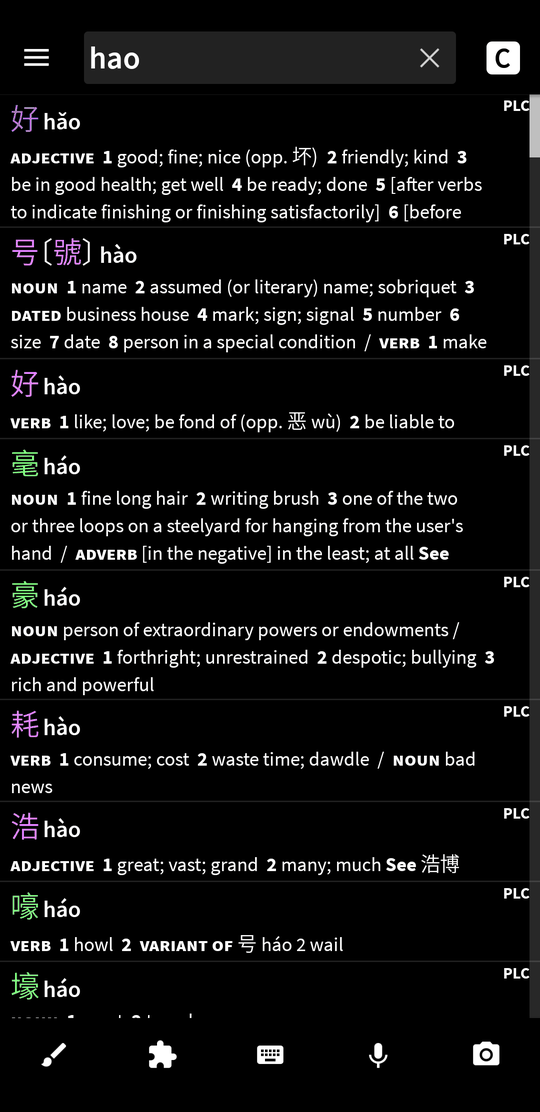
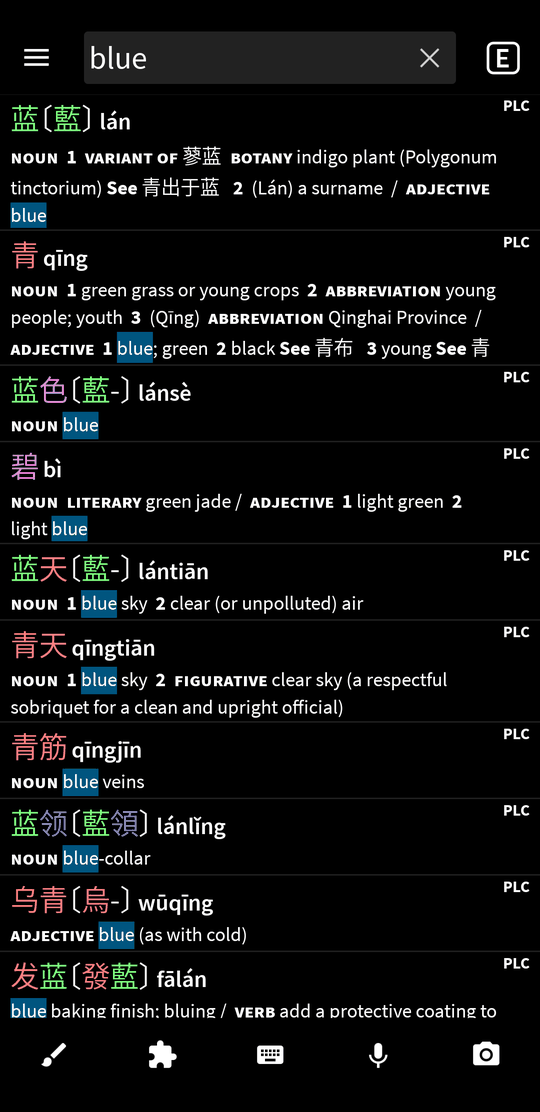
Why it's great: Pleco has been the default Chinese dictionary for fifteen years and nothing has seriously threatened it. Look a word up by pinyin, by character, by drawing it with your finger, or by pointing your camera at a sign. It works entirely offline, which matters more than you expect the first time you are standing in a shop in Chengdu with no signal.
The business model is unusual and worth understanding. The base app and its core dictionaries are free and genuinely complete, not a crippled trial. Extras (optical character recognition, the flashcard system, additional dictionaries) are bought individually as add-ons, once, forever. No subscription.
Flaws but not dealbreakers
It is not a course. Pleco will never tell you what to learn next. It is a reference, and it expects you to arrive knowing what you are looking for.
You can see the order but never the number. Pleco does sort results by frequency, so the ranking carries real information. What it never shows is a figure, so you cannot tell whether the second result is nearly as common as the first or a hundred times rarer, and the moment a word leaves the search list that ordering is gone. For a beginner deciding what is worth memorising, the gap between second and twentieth is exactly what you need to know.
The interface shows its age. It is dense, and the good features are buried behind tabs and long-press menus. Powerful once you know it, unwelcoming for the first week.
It is English to Chinese. If English is not your first language you are studying through a third one, and the nuances that separate two similar words are exactly what gets lost in the second hop.
Key features
- Dictionary: multiple licensed dictionaries, simplified and traditional, fully offline
- Input: pinyin, handwriting, camera OCR
- Standout: the free tier is a complete product rather than a trial
- Pricing: free core app, with one-time add-on purchases and no subscription
- Works on: iOS, Android
Best for absolute beginners: HelloChinese
HelloChinese
The closest thing to a complete beginner curriculum in an app, with tone and pronunciation training taken seriously from the first lesson.
Use this if: you are starting from nothing and want somebody else to decide the order.
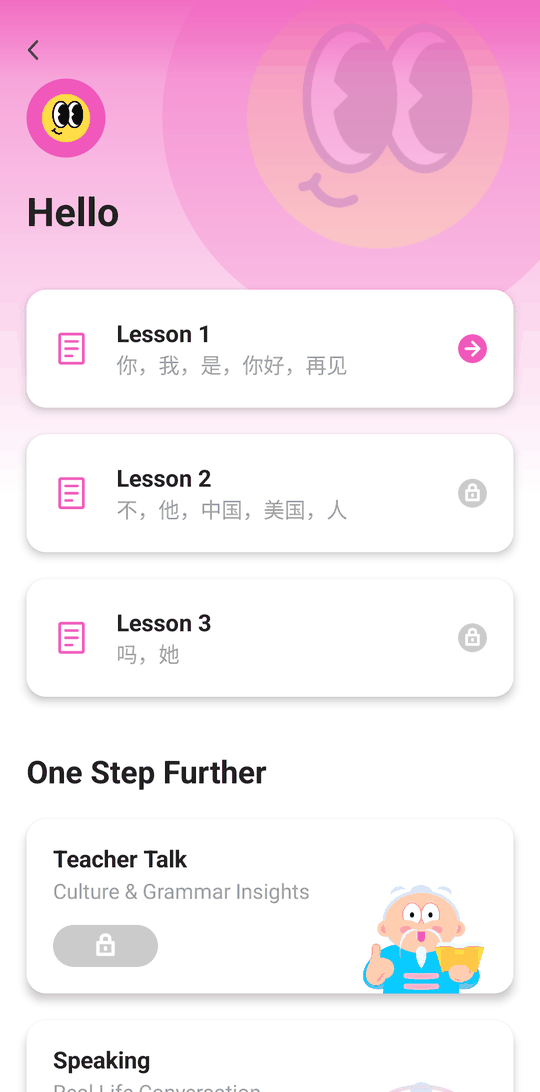
Why it's great: HelloChinese does only Chinese, and that focus shows immediately. It starts with pinyin and tones properly rather than rushing past them, includes speech recognition that will tell you your third tone is wrong, and teaches stroke order alongside vocabulary instead of treating writing as optional. The course runs from absolute zero to roughly lower-intermediate.
It is gamified in the same broad way Duolingo is, but the content underneath is built by people who clearly understand what makes Chinese specifically difficult. It also has a Spanish interface, which is rarer in this category than it should be.
Flaws but not dealbreakers
The free tier runs out early. You will hit the paywall well before the end of the beginner material, which makes it hard to judge the full course before committing.
You will outgrow it. The curriculum tapers off around lower-intermediate. It is a very good on-ramp and not a destination.
Vocabulary review is adequate, not excellent. It has spaced repetition, but it is built to support the lessons rather than to carry thousands of words on its own. This is the point where most people add a second app.
Key features
- Course: zero to roughly lower-intermediate, structured units
- Standout: dedicated tone drills and speech recognition from lesson one
- Writing: stroke order taught alongside vocabulary
- Languages: interface available in Spanish and many others
- Pricing: free early lessons, subscription for the rest
- Works on: iOS, Android
Best for reading practice: Du Chinese
Du Chinese
Levelled stories with native audio and tap-for-definition on every word. It fills the gap between finishing a beginner course and reading anything real.
Use this if: you have a few hundred words and real Chinese still looks like a wall.
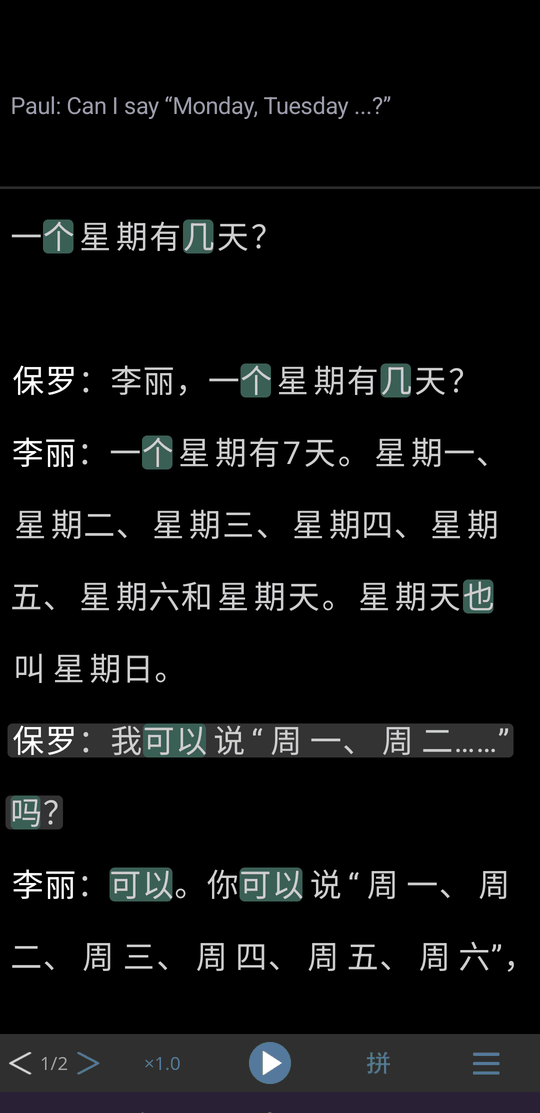
Why it's great: there is a canyon between the end of a beginner course and actual Chinese text, and Du Chinese exists to fill it. Short stories and articles graded by level, each with native audio, tap-for-definition on every word, and pinyin you can switch off as you improve. Reading material at exactly your level is the most underrated resource in language learning and the hardest to find on your own.
Flaws but not dealbreakers
Most of the library is paid. A handful of free stories rotate through, but the useful volume is behind the subscription.
It is reading and listening only. No writing, no speaking, and no real review system for the words you meet. It is a companion, never the main app.
It needs a running start. Below a few hundred words even the easiest texts become a wall of lookups, which is the experience it exists to prevent. Come back once a beginner course has given you a base.
Key features
- Content: graded stories and articles, updated regularly
- Audio: native narration on every text
- Standout: tap any word for an instant definition without leaving the story
- Pricing: some free stories, subscription for the library
- Works on: iOS, Android, web
Why frequency matters more than definitions
Every dictionary can tell you what a word means. Far fewer tell you how often anyone says it, and for a learner that second question is the more useful one. Pleco gets part of the way by sorting results with the commonest first; what is missing everywhere else is a number you can actually compare.
Chinese has an unusually wide gap between the everyday word and the formal or literary one that means roughly the same thing. Three pairs you will run into early:
- 好 (hǎo) is the "good" you will hear a hundred times a day. 良好 (liánghǎo) also means good, but it belongs on a school report or a medical form.
- 看 (kàn) is "to look". 注视 (zhùshì) also means to look, in the sense of gazing fixedly, and it is mostly written rather than spoken.
- 吃 (chī) is "to eat". 食用 (shíyòng) means to eat too, but you will see it on packaging, not hear it at dinner.
Look any of those up in a normal dictionary and both halves of each pair come back looking equally valid. Learn the wrong one and you have spent the same effort for a word that will almost never come up, and you still will not know the one that will. Multiply that across a few thousand words and it is the difference between vocabulary you can use and vocabulary you can only recognise on a page.
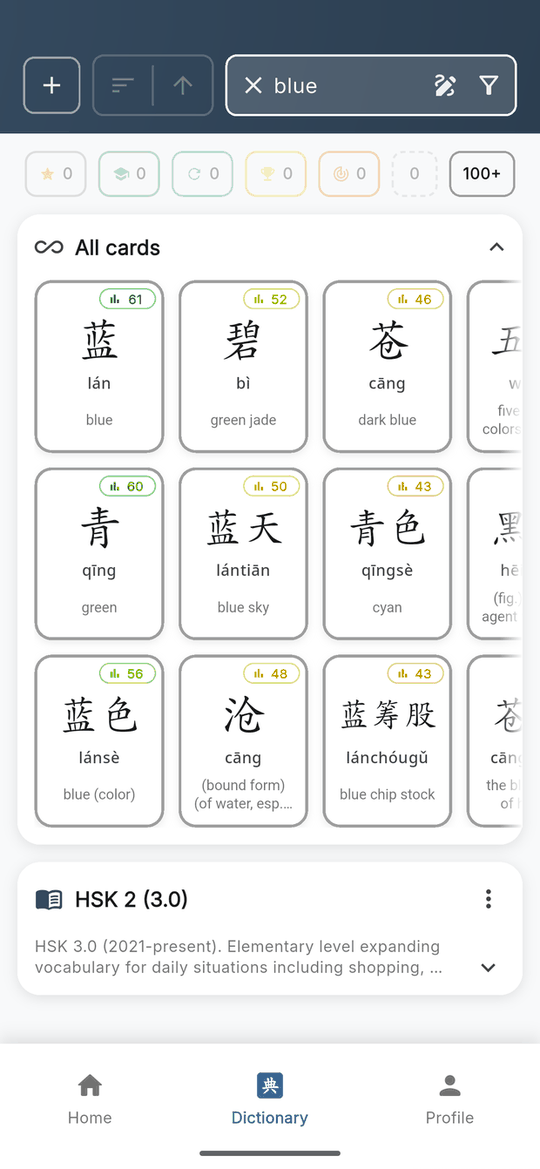
This is the single reason Hanzio exists in a category that already had good apps in it, and it is why the frequency column in the table above has exactly one app showing a number.
How we picked
We started from the apps Chinese learners actually name when you ask them what is on their phone, rather than from app store rankings, which are dominated by general language apps that happen to have a Mandarin course. That gave a shortlist of seven covering four different jobs: looking words up, following a course, drilling vocabulary, and reading.
We then judged each against the four criteria above, and against one practical test: what does a realistic setup look like six months in? That question is what pushed the picks toward apps that do a whole job rather than apps that do a step of one. It is also what exposed the weakness in the tools that expect you to bring your own vocabulary, which is a much bigger ask than it sounds when you are new enough not to know which words matter.
Prices move and free tiers change, so we describe the shape of each one rather than quoting a number that will be wrong in three months. Check the store listing before you commit.
The competition

Skritter
Skritter got to stroke-level handwriting practice long before anyone else, drilling characters stroke by stroke on a spaced schedule and correcting the order and direction of each one in the moment. That principle, that you should have to produce a character rather than recognise it, is the one Hanzio's writing mode is built on, and we would rather say so than pretend we arrived at it independently. It is also more than a writing app, which it rarely gets credit for: it splits each word into writing, reading, definition and tones, and schedules them separately.
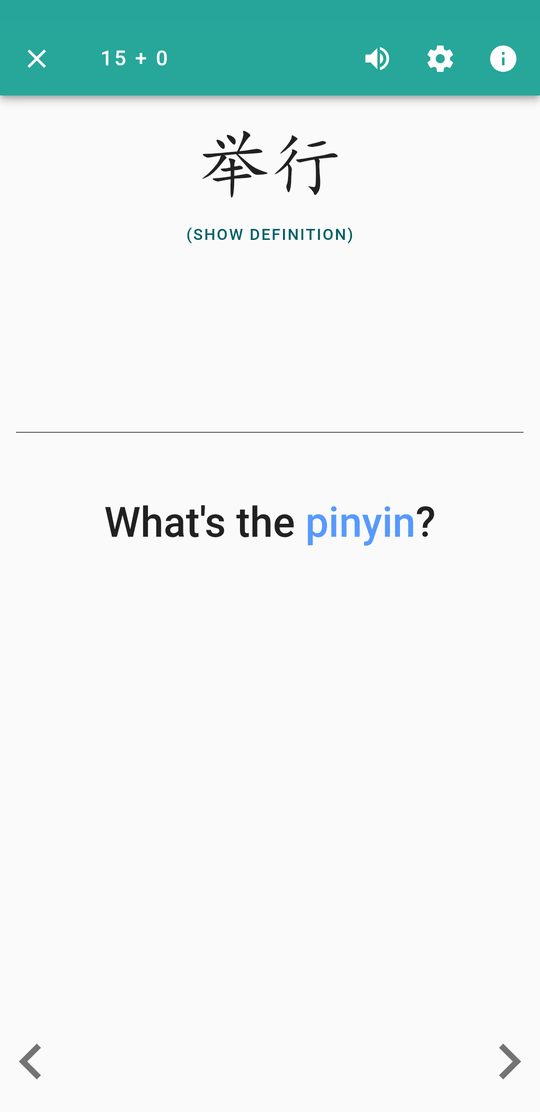
What keeps it out of the picks is upstream. Skritter has no dictionary. It reviews vocabulary; it does not help you find any. Its own documentation walks you through importing your word list out of Pleco, and describes those users as people who "look up words in Pleco, but would like to study and learn them elsewhere". That tells you where it sits in most people's setup: a third app, after the dictionary and the course, on its own subscription with no real free tier. Nothing in it tells you how common a word is, so your list is only as well ordered as whoever wrote it, and there is no audio recall mode. Worth it if you already have a word list you trust and want a specialist to drill it into you.

Anki
Anki is a general-purpose spaced repetition system, not a Chinese app, and that is both the strength and the problem. The scheduling is excellent, it is free everywhere except iOS (a single one-time purchase that funds development), and the ceiling on what you can build is essentially unlimited: custom card types, audio, stroke diagrams, anything.
The cost is that all of it is your job. Anki ships with no Chinese content, so you either import a shared deck of unknown quality or build your own, and the hours spent on card templates are hours not spent learning Chinese. Plenty of people have quit Chinese while feeling extremely productive about their Anki setup. Choose it if you enjoy tinkering or need vocabulary no ready-made app covers.

Duolingo
It is fashionable to be rude about Duolingo and mostly unfair. It is the most-used language app on earth because it solved the problem that actually kills most learners, which is not pedagogy but quitting in week three. The streak mechanic works, and people who would have stopped keep going.
The Mandarin course specifically is the weakest part of the offering. Tones get far less attention than they need, character writing is barely present, and the translation-heavy format lets you pass lessons by pattern-matching rather than knowing anything. Treat it as the habit layer, not the curriculum, and do not mistake a long streak for knowing Chinese.
How to combine them
Plenty of people get by with one app, but most end up with two or three, and the useful question is which combination. It comes down to three jobs: something to look things up in, something to tell you what is next, and something to make it stick.
Complete beginner: HelloChinese for the curriculum, a dictionary for lookup. That is it. Do not add a third app until you have finished the pinyin and tones material, because more apps at this stage is procrastination with extra steps.
Past the basics, vocabulary not sticking: you need something that reviews, and the real choice is how much assembly you want. Skritter or Anki if you already have a word list and a dictionary you like, since both expect you to bring the vocabulary. Hanzio if you would rather the lookup and the reviewing be the same app and have the ordering decided by frequency.
Can read a bit, want fluency: Du Chinese for volume, plus whatever you review with. Reading a lot of slightly-too-easy material beats grinding flashcards once you have a base.
Preparing for HSK or planning to write by hand: make sure whatever you review with actually makes you draw the strokes. Skritter and Hanzio both do; most of the rest do not.
The one combination to avoid is three apps that do the same thing. Two review apps is not twice the retention, it is two sets of intervals fighting each other.
Frequently asked questions
What is the best app for a complete beginner?
HelloChinese. It is the only app here that will take someone from never having seen a Chinese character to holding a simple conversation without a textbook alongside it. Add a dictionary from day one, because you will want to look words up.
What is the best app for HSK?
HelloChinese for the grammar and the structure, plus a review app for the vocabulary, because the HSK word lists are long and rote. No app on this list is an official HSK course, so treat the level labels as a guide rather than a syllabus.
What is the best free app to learn Chinese?
Pleco plus Anki. Pleco's free dictionary is genuinely complete rather than a trial, and Anki is free everywhere except iOS. Between them you get lookup and long-term review at no cost, at the price of setting it all up yourself. If you would rather skip that setup, Hanzio's dictionary is free too and its study mode has a free daily allowance.
Which Chinese app works offline?
Pleco and Hanzio both work with no signal, dictionary included. Course and reading apps generally need a connection for anything you have not already downloaded, so if you are travelling, a dictionary is the one to have on the plane.
Which app teaches handwriting?
Skritter and Hanzio are the two that make you draw the strokes rather than tap an answer. HelloChinese teaches stroke order alongside its lessons but does not drill it at the same depth, and Duolingo barely touches writing at all.
Is Pleco worth paying for?
The free dictionary is enough for most learners and is not a trial. The add-ons worth considering are camera OCR if you are travelling or reading signage, and the flashcard system only if you have no other review app. If you already have one, skip it.
Is Anki good for Chinese?
It is excellent at scheduling and knows nothing about Chinese. Anki ships with no content, so you either import a shared deck of unknown quality or build your own. Choose it if you enjoy tinkering; avoid it if the setup is likely to become the hobby.
Is HelloChinese better than Duolingo for Chinese?
For Chinese specifically, yes. HelloChinese does only Chinese and takes tones and characters seriously from the first lesson, where Duolingo's Mandarin course is light on both. Duolingo is better at one thing, which is getting you to come back tomorrow.
Do I actually need to learn to handwrite characters?
For most learners, no, at least not to a calligraphic standard. But writing characters by hand is unusually good at stopping you confusing similar-looking ones. Even if you never write Chinese outside an app, the practice pays for itself in reading accuracy.
Should I learn simplified or traditional characters?
Simplified if you are aiming at mainland China, Singapore or the HSK exam. Traditional if you are aiming at Taiwan, Hong Kong or Macau. If you have no particular target, simplified has more learning material available. Pleco, Hanzio and Skritter all handle both; some course apps are still simplified-first.
Can I become fluent using only apps?
No. Apps are very good at the first few thousand words and the mechanics of characters and tones, and they stop well short of fluency. Treat them as the fastest way to build the base you need before conversation, reading and time do the rest.
Is Duolingo enough to learn Chinese on its own?
No. It is good at getting you to show up every day, which is not nothing. But it is light on tones, light on characters, and it will not teach you to write. Treat it as the habit layer, not the curriculum.
The short answer
If characters are what is stopping you, start with our top pick and add a course. If you are on day one, start with HelloChinese instead. Either way get a dictionary, and once you can read a little, add graded reading. And whatever you pick, choose a combination you will still be opening in six months, because the best app for learning Chinese is overwhelmingly the one you keep using.
Keep lookup and review in one place
You will still want a course and something to read. What you should not need is to copy words out of one app so that another one can help you remember them. Look a word up, see whether it is worth learning, and start studying it without leaving the page. Try it on your next 100 words. The dictionary is free.